The VB .NET IDE: Visual Studio .NET
- Creating a New Solution
- The Editor
- The Solution Explorer
- Properties Window

Finwaver.com
Your school or business runs better on finwaver.com. Sign up for free one (1) week try.
Console Application
The entry point for a console application is the SubMain in a module
If you choose a Console Application from the NewProject dialog box, you get a framework for a
Sub Main in a module as the entry point, as shown here:
Module Module1
Sub Main()
End Sub
End Module
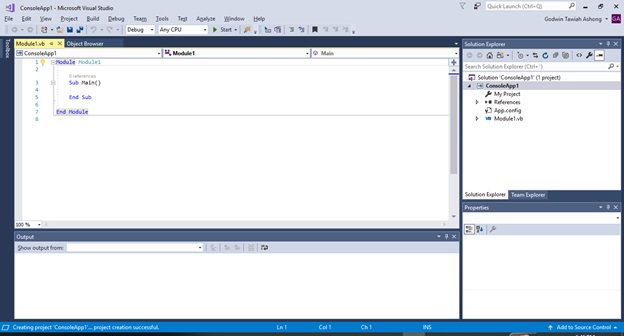
NB: As explained in week 1, to start a new project select File -> New -> Project and choose console application.
Notice that, unlike in VB6, the module name is given in the first line (shown in
the code in bold). Here we accepted the default name of Module1.
The custom is that this name matches the name given the file. So, for example, if you changed
the line of code to read:
Module Test1
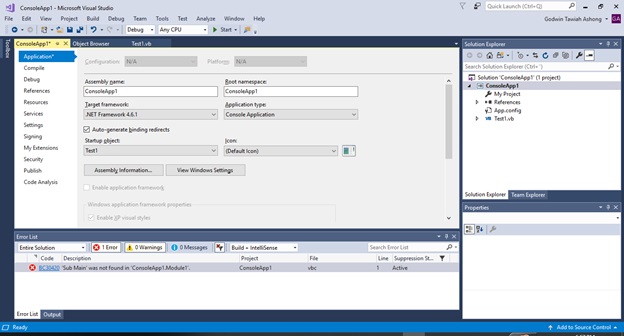
and tried to run the console application, you would get this error message:
Startup code 'Sub Main' was specified in'Test.Module1',
but 'Test.Module1' was not found
NOTE: To run the project press F5function key.
To change the name of a module after you created it,follow these steps:
1. Change the name of the module in the code window.
2. Change the name of the module in the Solution Explorer from Module1 to Test1.
3. Right-click the ConsoleApp1 line in the Solution Explorer and
choose Properties.
4. In the dialog box that appears (see Figure below),make sure the Startup
Object is set to the name of the module(Test1).
The application ends when the End Sub of the Sub Main is reached.
For example if you add the code after the Sub Main:
Console.WriteLine("Hello world")
The console will display Hello world and quickly disappears when the End Sub line is reached.
If you wish the console to stay around until you press the Enter key, add the command:
Console.ReadLine()
This line makes the console stay around because the ReadLine() at least waits for the user to hit the Enter key—more on this useful method later.
Thus the complete code will be:
Module Test1
Sub Main()
Console.WriteLine("Helloworld")
Console.ReadLine()
End Sub
End Module
Console.WriteLine("Helloworld")
We are asking the Console class to use its WriteLine method that can display text
The text you want to display must be surrounded by double quotes and surrounded by parentheses
Console.ReadLine()
The ReadLine method is to wait for theEnter key to be pressed.
The ReadLine method is more commonly used together with an assignment to a variable in order to get information from the console.
Statements in VB .NET
If you use a text editor to write a VB .NET program,then you do not benefit from the IntelliSense features built into the editor.The suggestion is to use the IDE, because the IntelliSense feature is really useful in dealing with a framework as rich as .NET. The IDE editor even corrects some common typos, such as leaving off the () in certain method calls.
Comments
Comment statements are neither executed nor processed by VB .NET. As a result, they do not
take up any room in your compiled code. The comment is usually to help understand the code.
There are two ways to indicate a comment.
The usual way is with a single quote as in the line in bold:
Module Test1
Sub Main()
Console.WriteLine("Helloworld")
'Wait for a key to bepressed'
Console.ReadLine()
End Sub
End Module
You can still use the older REM keyword that dates back to the original days of BASIC in the early 1960s! REM stands for REMARK
Thus the two ways of commenting in VB is shown below:
Module Test1
Sub Main()
Console.WriteLine("Helloworld")
'Wait for a key to bepressed'
REM Wait for a key tobe pressed
Console.ReadLine()
End Sub
End Module
NOTE:
When using REM for commenting in the same line as command syntax, the REM should be the last statement. Thus it should come after the statement, otherwise the statement will be seen as a comment.
Thus:
Module Test1
Sub Main()
Console.WriteLine("Helloworld")
'Wait for a key to be pressed'
Console.WriteLine("InlineWith Comment") REM Wait for a key tobe pressed
Console.ReadLine()
End Sub
End Module
And Not:
Module Test1
Sub Main()
Console.WriteLine("Helloworld")
'Wait for a key to be pressed'
REM Wait for a key tobe pressed Console.WriteLine("Inline With Comment")
Console.ReadLine()
End Sub
End Module
Variables and Variable Assignments
Variable names in VB .NET can be up to 255 characters long and usually begin with a Unicode letter ,although an underscore is also permitted as the first character. After that,any combination of letters, numbers, and underscores is allowed. All characters in a variable name are significant, but as with most things in VB .NET, case is irrelevant.
firstBase is the same variable as firstbase.
Assignments are done with an = sign, just as in earlier versions of VB:
age = 19
You also cannot use names reserved by VB .NET(see Table below for the current list) for variable names unless you surround them with brackets. For example, Loop is not acceptable as a variable name, but [Loop] would work—even though there is no good reason to do this.
Embedded reserved words work fine. For example, loopIt is a perfectly acceptable variable name. VB .NET will underline the keyword and present an error message if you try to use a reserved word as a variable name.
Current VB .NET Keyword List
| AddHandler | AddressOf | Alias | And | Ansi |
|---|---|---|---|---|
| As | Assembly | Auto | Binary | BitAnd |
| BitNot | BitOr | BitXor | Boolean | ByRef |
| Byte | ByVal | Call | Case | Catch |
| Cbool | Cbyte | Cchar | Cdate | Cdec |
| CDbl | Char | Cint | Class | CLng |
| Cobj | Compare | Const | Cshort | CSng |
| CStr | Ctype | Date | Decimal | Declare |
| Default | Delegate | Dim | Do | Double |
| Each | Else | ElseIf | End | Enum |
| Erase | Error | Event | Exit | Explicit |
| ExternalSource | False | Finally | For | Friend |
| Function | Get | GetType | GoTo | Handles |
| If | Implements | Imports | In | Inherits |
| Integer | Interface | Is | Lib | Like |
| Long | Loop | Me | Mod | Module |
| MustInherit | MustOverride | MyBase | MyClass | Namespace |
| Next | New | Not | Nothing | NotInteritable |
| NotOverridable | Object | Off | On | Option |
| Optional | Or | Overloads | Overridable | Overrides |
| ParamArray | Preserve | Private | Property | Protected |
| Public | RaiseEvent | ReadOnly | ReDim | REM |
| RemoveHandler | Resume | Return | Select | Set |
| Shadows | Shared | Short | Single | Static |
| Step | Stop | Strict | String | Structure |
| Sub | SyncLock | Text | Then | Throw |
| To | True | Try | TypeOf | Unicode |
| Until | With | When | While | WithEvents |
| WriteOnly | Xor |
Numeric Data Types
Non-numeric Data Types
The Date data type represents a date and/or a time. Asin VB5, you surround a literal that represents a date and time by two #s, asin #Jan 1, 2001#.
Characters are usually surrounded by single quotesfollowed by a C, as in: “H”C.
Note that if you use one character within quotes without the “C” suffix, you get a String rather than a Char and the two are not automatically convertible.
Declaring Variables
Syntax:
Dim VariableName As Data Type
The = sign is used for assignment.
Examples:
Dim name As String
name = “Godwin Ashong”
You can initialize a variable when you are declaringit.
The above example can therefore be written as:
Dim name As String = “Godwin Ashong”
Dim age As Integer = 19
Dim salary As Double = 5000
The sample code looks like this:
Module Test1
Sub Main()
Dim name As String = "GodwinTawiah Ashong"
Dim age As Integer = 19
Dim salary As Double = 5000
Console.WriteLine("Your Name is " + name)
Console.WriteLine("Your age is " + age.ToString)
Console.WriteLine("Your monthly salary is " + salary.ToString)
Console.ReadLine()
End Sub
End Module
NOTE:
You can join variable display using the & character or +. When using the +, remember to convert other variable types which are not string by calling the ToString method as shown above.
The code below shows the same result as the codeabove:
Module Test1
Sub Main()
Dim name As String = "GodwinTawiah Ashong"
Dim age As Integer = 19
Dim salary As Double = 5000
Console.WriteLine("Your Name is " & name)
Console.WriteLine("Your age is " & age)
Console.WriteLine("Your monthly salary is " & salary)
Console.ReadLine()
End Sub
End Module
You can combine multiple declarations on a single line.
Example:
Dim i,j,k,l As Integer
Dim name,phone,address as String
Note that you cannot use an initialization whenyou do multiple declarations on the same line, so lines such as this are notallowed:
Dim i, j, k,l As Integer = 1
Arithmetic Operators
| OPERATOR | OPERATION |
|---|---|
| + | Addition |
| - | Subtraction (And to denote negative numbers) |
| / | Division (conversion to double - cannot cause a DivideByZero exception) |
| \ | Integer division (no conversion to double—can cause a DivideByZero exception) |
| * | Multiplication |
| ^ | Exponential |
| Mod | The remainder after integer division. |
Practice
Write a program that converts a degree Celsius toFahrenheit
Solution
Useful Syntax
CDec(Console.ReadLine())
For taking values entered by a user.
The complete syntax for the above programwill be:
Module Test1
Sub Main()
Dim degree,fahrenheit As Double
Console.WriteLine("Pleaseenter the degree celsious")
'Get the degree valuefrom the user'
degree = CDec(Console.ReadLine())
'Calculate theFahrenheit '
fahrenheit = (9 / 5) * degree + 32
'Display thefahrenheit'
Console.WriteLine(degree & "Degrees is " & fahrenheit & " Fahrenheit")
Console.ReadLine()
End Sub
End Module
Practice
Write a program that takes a number from the user andcalculates modulus 2 of the number.
Solution
Syntax:
Number Mod 2
Complete Code
Module Test1
Sub Main()
Dim num, res As Integer
Console.WriteLine("Please enter a")
'Get the number fromthe user'
num = CDec(Console.ReadLine())
res = num Mod 2
Console.WriteLine(num & "Mod 2 is " & res)
Console.ReadLine()
End Sub
End Module
Constant
VB .NET also has the capability to create namedconstants that allow you to use mnemonic names for values that never change.
Constants are declared in the same way as variables,and the rules for their names are also the same: 255 characters, firstcharacter a letter, and then any combination of letters, underscores, and numerals.
Ideally, constant are named in Capital letters.
.Note that in VB .NET, with Option Strict on, you must declare the type of constants.
Syntax:
Const constantNameInCapitals As Data Type =valueOfConstant
Example
Const PI As Double = 3.14159
You can even use numeric expressions for constants, or define new constants in terms of previously defined constants:
Example
Const PI_OVER_2 As Double = PI / 2
And you can set up string constants:
Const USER_NAME As String = "Bill Gates"
Repeating Operations—Loops
VB .NET, like most programming languages, has languageconstructs for loops that repeat operations a fixed number of times, continuinguntil a specific predetermined goal is reached or until certain initialconditions have changed.
Determinate Loops
Use the keywords For and Next to set up a loop torepeat a fixed number of times.
For example, this code:
ModuleProgram
SubMain(args As String())
Dimi As Integer
Fori = 1 To 12
Console.WriteLine(i)
Nexti
EndSub
End Module
You do not always count by 1, the default. Sometimesit is necessary to count by twos, by fractions, or backward. As with allversions of VB, you do this by adding the Step keyword to a For-Next loop. TheStep keyword tells VB .NET to change the counter by a specified amount.
For example, to start a loop from the top to thebottom, you can use the Step -1 to subtract 1 from iterator at each repetition.
NOTE:
The Next for the increment is only used in the Forloop. For increment in other statement, we use the syntax:
variableName +=valueToAdd
For instance to add 1 to the variable index, thesyntax below can be written:
index +=1
Example
ModuleProgram
SubMain(args As String())
Dimi As Integer
Fori = 10 To 1 Step-1
Console.WriteLine(i)
Nexti
EndSub
EndModule
Nested Loop
A loop in another loop.
Example
SubMain(args As String())
Dimi, j As Integer
Forj = 2 To 12
Fori = 2 To 12
Console.Write(i * j & " ")
Nexti
Console.WriteLine()
Nextj
Console.ReadLine()
EndSub
RelationalOperators
| SYMBOL | CHECKS (TESTS FOR) |
|---|---|
| = | Equal |
| < > | Not equal to |
| < | Less than |
| <= | Less than or equal to |
| > | Greater than |
| >= | Greater than or equal to |
Do While Loop
Syntax
Do While Condition
Statement
Loop
Or
Do
Statement
Loop While Condition
The above Loop code could be modified to:
SubMain(args As String())
Dimi, j As Integer
j = 2
Do While j <= 12
For i = 2 To 12
Console.Write(i * j & " ")
Next i
Console.WriteLine()
j += 1
Loop
Console.ReadLine()
EndSub
OR
SubMain(args As String())
Dimi, j As Integer
j = 2
Do
For i = 2 To 12
Console.Write(i * j & " ")
Next i
Console.WriteLine()
j += 1
Loop While j <= 12
Console.ReadLine()
EndSub
Conditionals—Making Decisions
One Alternative
If condition is true then
Statement
End if
Example
SubMain(args As String())
Dimi, j As Integer
i = 2
If i = 2 Then
Console.WriteLine("Is 2")
EndIf
Console.ReadLine()
EndSub
Two Alternatives
If condition is true then
Statement
Else
Statement
End if
Example
SubMain(args As String())
Dimi, j As Integer
i = 3
If i = 2 Then
Console.WriteLine("Is 2")
Else
Console.WriteLine("Not 2")
EndIf
Console.ReadLine()
EndSub
Three or more alternatives
If condition is true then
Statement
ElseIf condition is true then
Statement
ElseIf condition is true then
Statement
Else
Statement
End if
Example
In a school, the following grading system is used:
| Score | Grade |
|---|---|
| 90 - 100 | A |
| 80 – 89… | B |
| 70 – 79…. | C |
| 60 – 69… | D |
| Below 60 | Fail |
Write a program which asks the user to enter thescore. Your program should output the grade to the user
CODE
SubMain(args As String())
Dimscore As Double
Console.WriteLine("Please enter your score:")
score = CDec(Console.ReadLine())
If score >= 90 Then
Console.WriteLine("Grade: A")
ElseIf score >= 80 Then
Console.WriteLine("Grade: B")
ElseIf score >= 70 Then
Console.WriteLine("Grade: C")
ElseIf score >= 60 Then
Console.WriteLine("Grade: D")
Else
Console.WriteLine("Fail")
EndIf
Console.ReadLine()
EndSub
Select Case
As an alternative to multiple ElseIfs, VB .NET continuesto offer the Select Case statement, which gives you a clearer way of selectingon the state of a variable or expression, as long as the value of theexpression is either numeric or string.
For example we can modify the above grading programusing the select case as shown below:
SubMain(args As String())
Dim score As Double
Console.WriteLine("Please enter your score:")
score = CDec(Console.ReadLine())
SelectCase score
CaseIs > 90
Console.WriteLine("Grade: A")
CaseIs > 80
Console.WriteLine("Grade: B")
CaseIs > 70
Console.WriteLine("Grade: C")
CaseIs > 60
Console.WriteLine("Grade: D")
CaseElse
Console.WriteLine("You fail")
EndSelect
Console.ReadLine()
EndSub
Assignment
Write a program which asks a user to enter a number.Your program should display whether the entered number is even or odd


Digital Address: GZ-033-0057
King Kotey Road
Teshie - Accra
Ghana
+233 54 753 9118
info@kuulchat.com

© Copyright 2015 - 2026
All Rights Reserved