Finwaver.com
Your school or business runs better on finwaver.com. Sign up for free one (1) week try.
1.
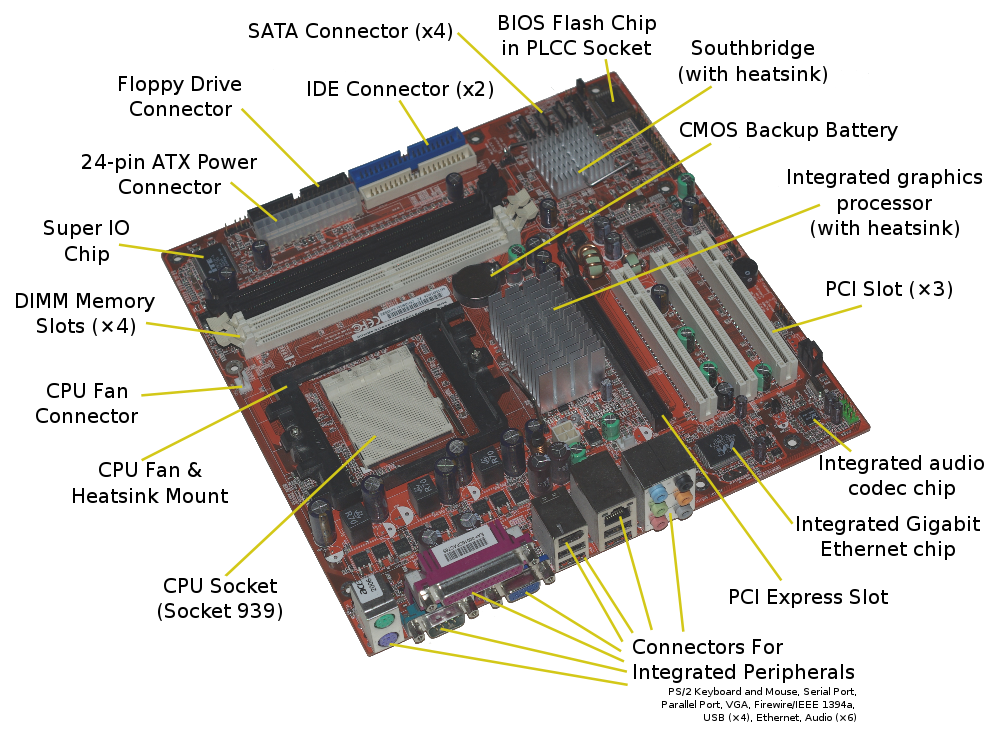
What is the primary function of the motherboard?
To process all mathematical calculations
To connect all internal components together and allow them to communicate
To provide permanent storage for all files and photos
To generate electricity for the computer
2.
Which of the following components is directly "housed" or slotted into the motherboard to act as the computer's "brain"
Hard Drive
CPU (Processor)
Monitor
Power Supply
3.
What was a major advantage of the Second Generation (Transistors) over the First Generation (Vacuum Tubes)?
They were smaller, faster, and more reliable
They were much larger and more powerful
They used artificial intelligence
They were only used for playing games
4.
Which of the following is an input device?
Printer
Speaker
Monitor
Mouse
5.
Which input device is most suitable for a graphic designer to create freehand drawings directly on a screen?
Optical Mark Reader (OMR)
Graphics Tablet (with Stylus)
Barcode Scanner
Numeric Keypad
6.
Which of these is considered "Primary Storage"?
RAM (Random Access Memory)
USB Flash Drive
Hard Drive
DVD
7.
What is the primary purpose of the Windows "Start Screen" or Start Menu?
To browse the internet directly
To act as a central hub for launching apps, searching, and accessing settings
To act as a permanent storage folder for all your photos
To turn off the monitor without turning off the computer
8.
In Windows, what are "Live Tiles"?
App icons that display real-time information, like weather or news, directly on the Start screen
Games that you can play without opening them
Buttons that only work when you have a touchscreen
Icons that move around the screen automatically
9.
What is a "Taskbar Preview" (or Thumbnail Preview)?
A small window that appears when you hover over a taskbar icon, showing what is currently happening in that app
A small advertisement for a new app
A way to see your files before you save them
A photo of the person who created the app
10.
Which of these is an example of a subfolder?
The main "C:" drive
A shortcut on the Taskbar
A file saved on a USB stick
A "action" folder located inside a "movies" folder
11.
What does a file extension (the letters after the dot, like .docx) tell the computer?
The name of the person who created the file
Where the file is physically stored on the disk
What type of file it is and which app should open it
How much the file cost to buy
12.
f you want to move a file from one folder to another without leaving a copy behind, which command should you use?
Copy and Paste
Cut and Paste
Save As
Delete and Undo
13.
What is the benefit of "Compressing" (Zipping) a folder before emailing it?
It reduces the total file size, making it faster to send
It makes the images in the folder look better
It translates the file into a different language
It adds a password to the folder automatically
14.
In a spreadsheet (like Microsoft Excel), what is a "Formula" primarily used for?
To perform automatic calculations using data from other cells
To change the font color of a cell
To save the file as a PDF
To add a title to the worksheet
15.
What is "Scratch" primarily used for in schools?
To send emails to other schools
To write long formal essays
To repair computer hardware
To introduce students to programming using visual blocks of code
16.
Which software is best for creating a visual report to present to a class?
Calculator
PowerPoint (Presentation software)
Excel
Notepad
17.
To prevent back and neck pain, how should your chair be positioned?
Without armrests so you can move more freely
As low as possible so your feet touch the floor
Adjustable to support the lower back, with your eyes level with the top of the screen
Tilted backward so you can lean away from the desk
18.
What is the "20-20-20 rule" used to prevent?
Eye strain
Finger cramps
Battery overheating
Keyboard dust buildup
19.
An "Ergonomic Keyboard" is specially designed to do what?
Connect to the computer without using any wires
Light up in the dark so you can see the keys
Reduce the strain on your wrists and hands while typing
Type faster than a normal keyboard
20.
What is the primary purpose of a Word Processor?
To create, edit, and format text-based documents like letters and reports
To create and manage complex databases
To perform mathematical calculations on financial data
To edit high-definition video files
21.
What is the difference between the "Backspace" key and the "Delete" key?
Backspace deletes to the right; Delete deletes to the left
Backspace deletes a whole word; Delete only removes one letter
Backspace deletes the character to the left of the cursor; Delete removes the character to the right
There is no difference; they both do the same thing
22.
Which keyboard shortcut is used to directly open the "Find and Replace" dialog box in MS Word?
Ctrl + F
Ctrl + R
Ctrl + H
Ctrl + E
23.
Which of the following can be done using the Advanced Find and Replace feature?
Replacing text only
Changing formatting, such as bold or font color
Replacing special characters
All of the above
24.
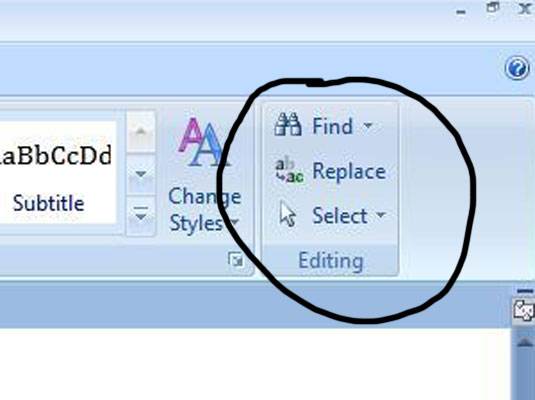
Which of the following is not found in the Editing group of the Home tab?
Find
Replace
Select
Thesaurus
25.
What is the purpose of the 'Go To' feature accessible from the Editing group?
To search for synonyms
To navigate to a specific page, line, or bookmark
To change the document layout
To save the document
26.
Which function key is used to open the Spelling and Grammar checker in MS Word?
F2
F5
F7
F11
27.
What is the purpose of the "Thesaurus" tool in MS Word?
To check spelling
To translate text
To find synonyms
To change language
28.
Where can you find the options to set the proofing language?
Home Tab
Insert Tab
Review Tab
Design Tab
29.
Every formula in Microsoft Excel must begin with which symbol?
+ (Plus)
@ (At)
= (Equal)
# (Hash)
30.
Which function key is used to edit the contents of the currently active cell?
F1
F2
F4
F5
31.
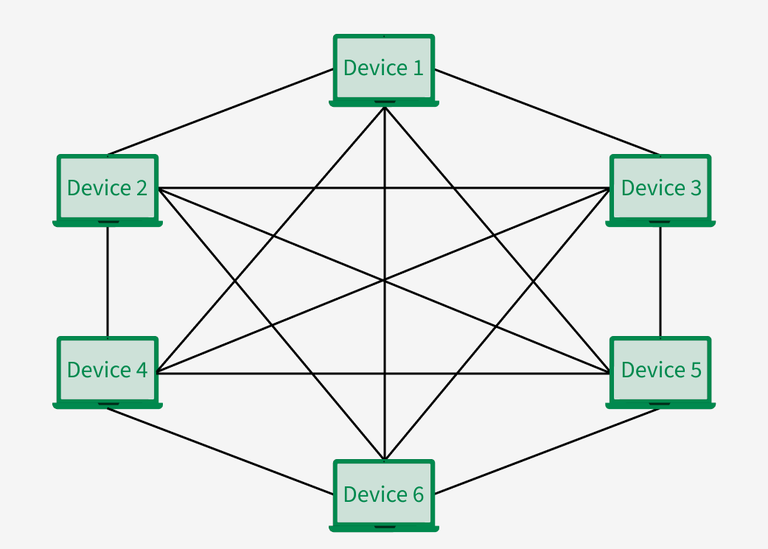
In which topology does every device connect to every other device, providing high reliability?
Bus
Star
Mesh
Ring
32.
If a computer on a network shares resources for others to use, it is called a
Server
Client
Mainframe
Router
33.
Which device is considered "non-intelligent" because it broadcasts data to every port?
Switch
Router
Hub
Bridge
34.
Which type of network connects devices within the immediate range of an individual person?
Local Area Network (LAN)
Wide Area Network (WAN)
Personal Area Network (PAN)
Metropolitan Area Network (MAN)
35.
What is a primary purpose of using social networking sites?
To watch movies
To maintain connections with friends and family
To play video games
To shop online
36.
Which of the following is a common risk associated with overusing social networking?
Increased physical activity
Improved grammar skills
Susceptibility to depression and anxiety
Enhanced real-world communication
37.
Which symbol separates the user name from the ISP in an e-mail address?
&
@
%
:
38.
Which security principle ensures that data is accurate and has not been tampered with?
Confidentiality
Integrity
Availability
Authentication
39.
Which of the following is NOT typically considered a form of intellectual property?
A functional invention
A brand logo or slogan
Real Estate
A choreographed dance routine
40.
What is the primary difference between a Constant and a Variable?
Constants are written in lowercase, while variables are in uppercase
Variables take up more memory than constants
A constant's value cannot be changed once it is assigned, while a variable's value can
Constants can only store numbers, while variables can store text
[60 marks]
This paper is in two sections: A and B. Answer Question 1 in Section A and any other three questions in Section B.
Answer all the questions in the spaces provided in this question paper. At the end of the examination, you should submit the entire question paper to the invigilator.
Any candidate who tears off any part of the question paper will be severely penalized.
Whether you answer all the questions in this paper or not, hand in the entire question paper to the invigilator.
Credit will be given for clarity of expression and orderly presentation of material.
SECTION A
[24 marks]
Answer Question 1.
[Compulsory]
An educational institution has computers in offices, computer laboratories and the canteen.
The computers are connected to the internet.
(a)
(i)
State three types of networks the network administrator may set up.
[3 marks]
(ii)
Explain briefly any two of the stated network types
[2 marks]
(b)
(i)
State two input devices of the computer used by the cashier in the canteen.
[2 marks]
(ii)
State two output devices of the computer used by the cashier in the canteen.
[2 marks]
(c)
Describe briefly how a student could use the computer to:
(i)
send an assignment document to a teacher using an email
[1 mark]
(ii)
read an email sent
[1 mark]
(iii)
forward an email received
[1 mark]
(iv)
send the same email to multiple recipients
[1 mark]
(d)
The administrator uses a software to enter the students' information
State the data types the programmer of the software used for the following information:
(i)
The first and last names
[1 mark]
(ii)
The age
[1 mark]
(iii)
School fees
[1 mark]
(iv)
Gender
[1 mark]
(v)
Phone number
[1 mark]
(e)
Describe briefly how the network administrator could apply the following key principles of information security to secure the information on the network:
(i)
confidentiality;
[2 marks]
(ii)
integrity;
[2 marks]
(iii)
availability.
[2 marks]
SECTION B
[36 marks]
Answer three questions only from this section.
A car mechanic is using a computer program to help identify why a car engine will not start. The program asks the mechanic a series of "Yes/No" questions, such as "Is there fuel in the tank?" and "Is the battery light on?" Based on the answers, the program suggests that the "fuel pump might be faulty"
(a)
What type of computer system is the mechanic using?
[1 mark]
(b)
Name the three main components of this system that allow it to work
[3 marks]
(c)
Explain the role of each component stated in (b)
[3 marks]
(d)
State one advantage of using this system instead of waiting for a human master mechanic.
[1 mark]
(e)
Define the following:
(i)
Artificial intelligence (AI)
(ii)
Machine learning
[2 marks]
(f)
Differentiate between artificial intelligence and machine learning.
[2 marks]
You went for a summer job interview in a company that builds robots.
During the interview, you were asked the following questions. Write your answers.
(a)
State the three laws of robotics
[3 marks]
(b)
State two uses of robots
[2 marks]
(c)
State two challenges of robots in their operations
[2 marks]
(d)
State and explain briefly, the components of a robot.
[3 marks]
(e)
State two robotic software pack
[2 marks]
Your computing teacher gave you the following tasks to perform in the computer laboratory. Describe how you will perform each task.
(a)
Replace every instance of 'Basic 9' with 'Basic 8' in the document.
[2 marks]
(b)
Find the word 'computing' in the document.
[1 mark]
(c)
Move the cursor to page 20 using the editing group
[2 marks]
(d)
Spell and grammer check in the word document.
[1 mark]
(e)
Translate the document to French
[2 marks]
(f)
(i)
What is Thesaurus in MS word?
[2 marks]
(ii)
Describe how to use the Thesaurus in MS word
[2 marks]
Bortey tries the following formulae in his spreadsheet to model the total cost of some items.
| A | B | C | D | |
| 1 | Item | Number of items | Cost per item | Cost |
| 2 | Pencil | 3 | 1.5 | =3*1.5 |
| 3 | Exercise Book | 5 | 3 | |
| 4 | Eraser | 1.5 | 1 | |
| 5 | Total |
Use the information to answer questions a to c
(a)
What should had been the most appropriate formulae in cell D2 and why?
[2 marks]
(b)
How can Bortey repeat the formulae to the other cells without retyping them?
[2 marks]
(c)
What formulae should Bortey enter in D5 to calculate the total cost
[2 marks]
(d)
Define the following programming terminologies:
(i)
variable;
(ii)
constant;
(iii)
flowchart
(iv)
algorithm.
[4 marks]
(e)
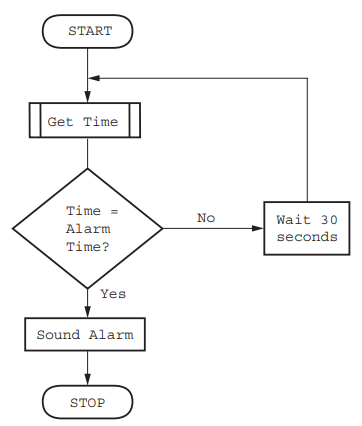
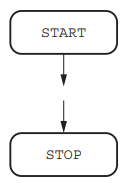
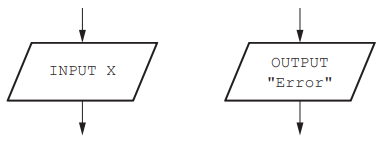
Draw a flowchart to illustrate how an alarm application works
[2 marks]


Digital Address: GZ-033-0057
King Kotey Road
Teshie - Accra
Ghana
+233 54 753 9118
info@kuulchat.com

© Copyright 2015 - 2026
All Rights Reserved